
What’s In A Password
By Orville Wright · · Updated
Passwords, in one form or another, have been around since biblical times. In ancient times, the Roman Army referred to them as Watchwords. Centuries later, Fernando Corbató, a professor at MIT, is credited with developing the first password system for the Compatible Time-Sharing System (CTSS), which allowed multiple users to access the same computer system.
Since then, passwords have undergone a metamorphosis, if you will, from being a simple 4 digit number to a process that can be extremely complex and lengthy. Naturally, whenever a new security system is introduced and implemented, it becomes the goal of the deplorables to thwart it. As you can imagine, hacking was born, and it, too, has undergone an evolution, as well.
From its humble beginnings, passwords like “1234” and “password”, the two most common passwords ever used, are easily overcome by today’s standards. Fast forward to our modern security systems with cryptographic keys, established protocols, and, well, overall inability to memorize them, we are overwhelmed.
If you don't change your password... SOMEONE ELSE WILL!
We Tried A Hack
To demonstrate how easy it is to crack open an 8-character password, we scoured the internet for an obscure, 8-letter, English word. Our word choice: Thumbkin (refers to a thumbscrew, a historical instrument of torture used to compress thumbs…ouch!). How long do you think it lasted? Check out the results below.
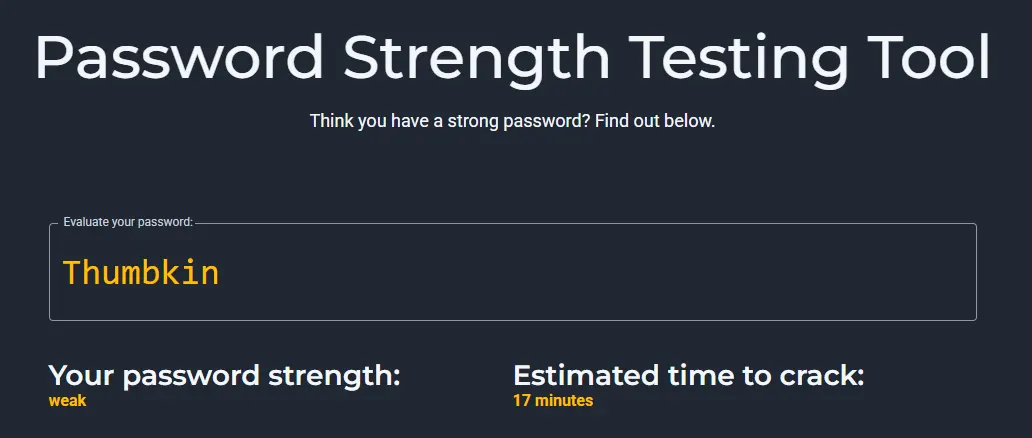
Would you like to test out one of your passwords? Head on over to Bitwarden (opens in new tab) and give it a try.
Size Does Matter
Today, as evidenced by this WordPress account creation through GoDaddy, their recommendation is to set a password that is between 8 and 48 characters, which includes at least one special character, one uppercase letter, one lowercase letter, and one number (see screenshot below). Our recommendation is a minimum of 22 characters. Naturally, bigger is better!
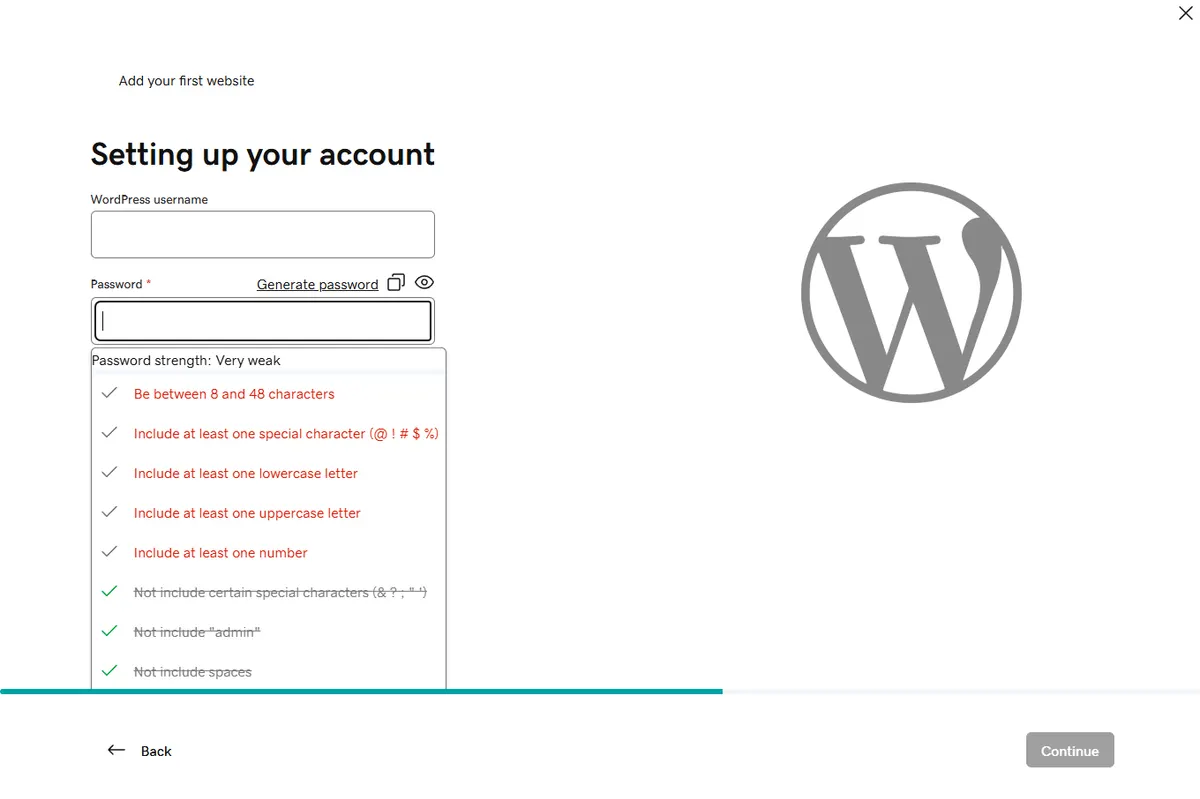
We are surprised that they still accept, and recommend, 8-characters. Yikes!
How Can I Keep Track Of Them?
That’s a great question! It’s also the bane of most users. Let’s not mince any words, I don’t care how good your memory is, you won’t remember 300 passwords that look like this – VAhH!qBYfE56jyJYTUCzqB. This is especially true when you tell yourself, “I’ll remember that one!”
If it helps, you can use passwords that are memorable, like MyDogAte3BurritosOnTuesday! or *SheSellsSeaShellsByThe1Seashore* (try saying that 3 times fast).
A KISS For You
Relying on the KISS Method (Keep It Super Simple), just write it down! We recommend a password book like “The Secret Oracle (opens in new tab)”. The approach is simple—it can be stored in a safe or other secure spot. In an emergency, you can take it with you. As a bonus, it doesn’t even look like a password book when sitting on a shelf.
Ultimately, you can use whatever works for you. We’ve seen coffee-stained notebook paper, stacks of sticky notes, and old, tattered address books. Whatever your preference, use it.
It’s Not Just a Browser Anymore
One option is saving your passwords directly in your browser. Most modern browsers, built on Google’s Chromium Project (like Chrome), include a built-in password manager that can store usernames and logins. If you set up a browser account, your data can be synchronized across devices, making recovery much easier when something goes wrong.
As an aside, did you know that Google Password Manager uses bank-grade encryption to keep your information safe.
Caveat
There’s one caveat: if your account is using a small, weak password, you are still vulnerable to a hack. Let’s change that password now!
What’s next?
The third recommendation for keeping track of your passwords is to use a password manager. This can be LastPass (opens in new tab), Dashlane (opens in new tab), RoboForm (opens in new tab), or whatever app you like. There are free versions, but most are now subscription based. I know, I know, why should you spend money. I get it. However, for a few dollars a month, you can have peace of mind.
Would you believe…?
 The average user has around 300 passwords for both personal and business? It’s true!
Keeping them current is a daunting task even for the best of us. So, to keep things simple, we recommend changing/updating 5 or 10 a week. This keeps them fresh as well as keeping them current with recommended standards.
The Trap
Oh, and don’t fall into the trap of using the same password multiple times! It will come back to byte you in the end (see what we did there?). Hackers count on a user’s being lazy and repetitive! Fake them out…Be Diligent!
Recap
✅ Do: Use unique passwords.
✅ Do: Use long passphrases.
✅ Do: Use a manager.
✅ Do: Write it down.
❌ Don’t: Reuse passwords.
❌ Don’t: Rely on memory.
❌ Don’t: Use “1234” or “password”.
Start today—update just 5 passwords this week. Your future self will thank you.
A Free Gift For You
Want all of this in one place? Download our free guide, Strong Passwords: Your Essential Guide. No sign-up, no strings attached.